What moves the operation forward
The essential actions required to handle a call and create an incident.
A concept for a 911 platform focused on the core emergency-response flow: less friction for call-takers and less unnecessary complexity in the product.
When someone calls 911, a Call-taker answers the call and starts gathering the information needed to understand what is happening.
Through the conversation, they need to determine whether the situation requires an operational response, build enough context to turn it into an incident and allow that response to begin. If the call is actionable, the information becomes an incident record that moves forward to Dispatch.
A CAD (Computer-Aided Dispatch) platform can bring together rules, configurations and capabilities designed to support different emergency-response environments.
This concept started from a different goal: Protect the core of the operation and keep secondary complexity from competing with it.
Simplifying had two dimensions: making the operation easier to perform and making the product itself simpler to build.
Design a concept for the Call-taker role that prioritized the incident-handling flow and organized the rest of the functionality around it.
The research combined operational experience with functional knowledge of the system to understand not only where friction appeared, but how incident handling actually works in practice.
They showed how they receive, interpret and turn a call into an incident as part of their day-to-day work.
When another call comes in or the task changes, regaining context can become part of the work itself.
Call-takers · qualitative synthesis“If another call comes in, I can lose what I was entering.”Call-taker · anonymized interview
A second perspective on the product.
They brought a broader understanding of the system’s rules, configurations and behavior. Their perspective helped contrast what Call-takers described with the product logic behind it.
“The minimum information required to route an incident should be available on a single screen.”QA · anonymized interview
Shared patterns across all interviews conducted.
Recurrence across the five interviews conducted. This does not represent prevalence across the full user population.
Before thinking about the interface, I reconstructed how a call moves from the moment it comes in to the point where the Call-taker finishes their part of the process.
Incident handling isn’t a linear form. It starts with incomplete information, evolves throughout the conversation and can trigger a response before data entry is finished.
Once the journey was clear, I identified the actions that were essential to handling an incident and separated them from everything that could extend or configure the experience.
The core journey wasn’t a stripped-down version of the CAD. It was the foundation everything else needed to work around.
The goal wasn’t to reproduce every possible CAD capability. It was to define what needed to be present for the product to create value for its users.
With the core flow defined, I translated the findings into concrete product behaviors.
| What I learned | What the operation needs | How the concept responds |
|---|---|---|
| Not every call should become an incident | Understand the situation first, decide what to do with it second. | Allows context to be captured before determining whether the call is actionable and creating the incident record. |
| Information arrives progressively | Capture information as the conversation unfolds. | Gives greater prominence to location, classification and description, while allowing sections to be reorganized around different ways of working. |
| Continuity is critical during a call | Keep working without rebuilding context. | Keeps active information visible to reduce unnecessary jumps between views. |
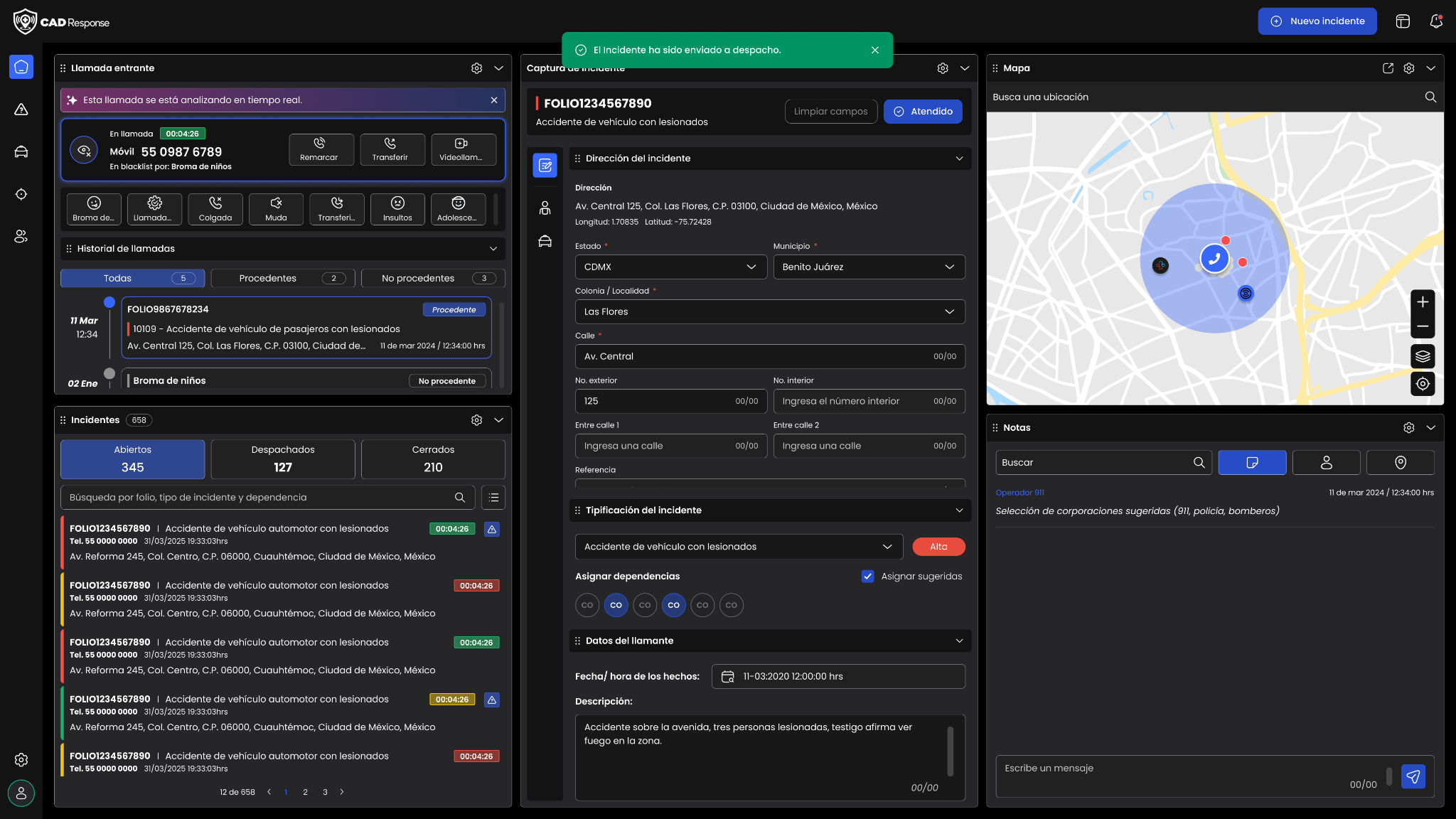
| Classification activates the response | Allow Dispatch to begin without waiting for data entry to be completed. | Sends the incident to Dispatch while the Call-taker can continue adding information. |
| The map should provide context without competing with the task | Check location without sacrificing the space required for call handling. | The map acts as contextual support and gives up space when data entry needs more room. |
| Performance affects continuity | Maintain the pace of an intensive operation. | Reduces unnecessary load around the core journey and makes waiting states visible. |
| The core flow keeps the operation moving | Keep critical actions clear and accessible. | Organizes the interface around the actions that move an incident forward. |
| The system needs to communicate what is happening | Work with confidence about the state of each action. | Important transitions provide visible feedback and clear state changes. |
Simplifying didn’t mean removing capabilities. It meant protecting what keeps the operation moving so secondary complexity wouldn’t compete with what matters most.
The screens aren’t the starting point of this case study. They’re the result of decisions around hierarchy, flexibility and continuity within the operation.
The interface is designed as a modular system that brings critical information together and keeps the tools Call-takers need close to the task.
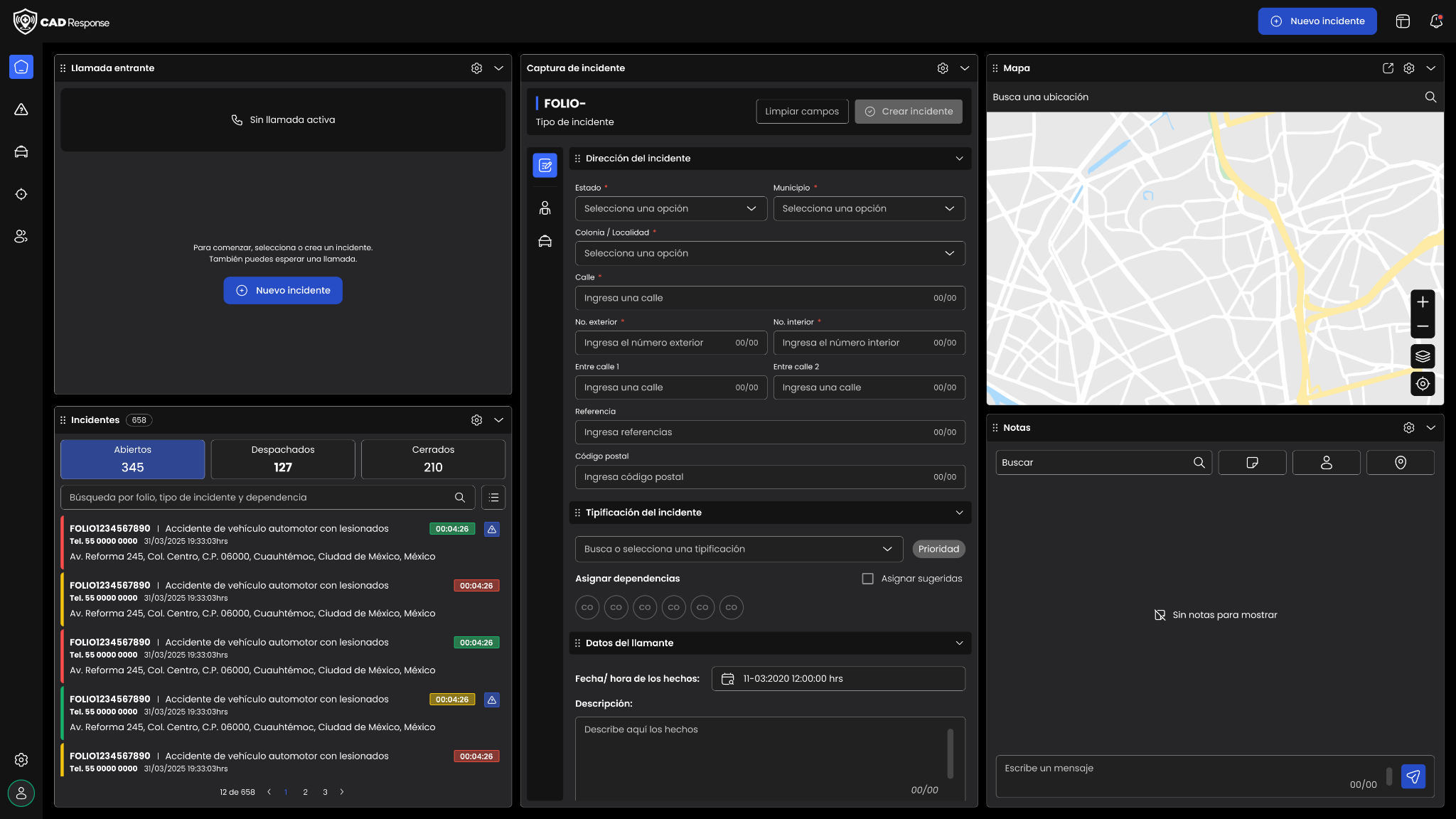
The concept aims to reduce visual and cognitive load so the system supports the way people actually work instead of forcing them into a rigid structure.
Classification doesn’t end data entry. It activates the response.
The lookup experience preserves the same mental model and lets Call-takers recover information without rebuilding the task from scratch.
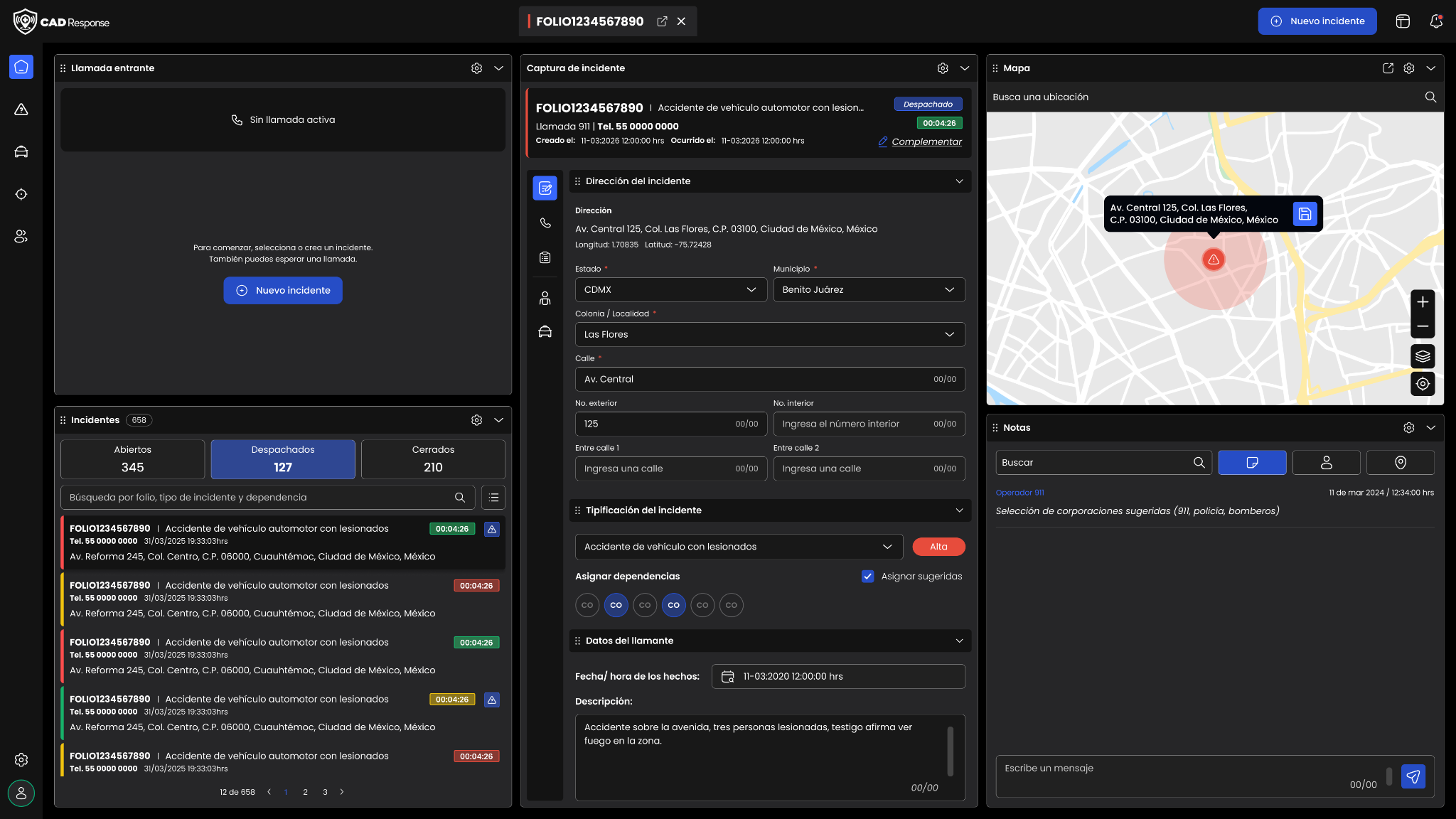
Simplifying a critical operation doesn’t mean eliminating complexity. It means deciding where that complexity should live so the parts that keep emergency response moving remain protected.
In a critical operation, the actions that move an incident forward need to be clear, fast and reliable.
Call-takers can have different ages, levels of digital experience and ways of working. The system needs to accommodate that diversity.
The person handling the call may not be a technology expert, but they are an expert in emergency response. The tool should reduce friction rather than require unnecessary technical knowledge.
Customization creates value when it supports the way people actually work: reorderable panels, prioritized information and readily available context.
Every second can affect how quickly an emergency begins receiving a response. Performance, clarity and continuity are part of the experience.